- Posts: 210
- Thank you received: 29

I need Help but not from Tuan
- Chris Jarvis
- Topic Author
- Offline
- Elite Member
-

Less
More
8 years 10 months ago #98996
by Chris Jarvis
I need Help but not from Tuan was created by Chris Jarvis
:whistle: :whistle: :whistle:
Everyone on this forum should know how amazing Tuan is and how helpful he always is.
Going above and beyond every day for us.
A couple of months ago he kindly supplied me some Custom CSS code to change the Register (Individual) button background colour to our corporate red: #EC1C24
This was perfect but I also wanted to change the text colour to white. Tuan is a busy guy and asked me to work that out myself and rightly so.
However it turns out I'm dumber than I realised and cannot figure this out at all. I don't know the coding side of things for Event Booking well enough and have searched and searched and tried adding font colour attempts of #FFFFFF without any success in the Custom CSS tab.
I feel pretty lame and admit defeat but don't want to bother Tuan again still. I'm hoping there is a bright spark reading this (without wasting Tuan's time) that can help me along. I'm happy to learn what I need to do or will learn if I can see how to add the part that involves the font color.
The code supplied by Tuan for the Custom CSS is:
#eb-event-page #eb-event-details .eb-taskbar ul li a{
background: #EC1C24;
}
#eb-event-page #eb-event-details .eb-taskbar ul li .cboxElement{
background: #F5F5F5 none repeat scroll 0 0 !important;
}
and it works great.
I can see that the background: # EC1C24; part is our red and relates to the button colour but have played around adding #FFFFFF to font color or foreground and I just don't understand how things are constructed enough unfortunately
I've figured so much out with the JoomDonation extensions but this is beyond me still at the moment sorry
:S
Chris
Everyone on this forum should know how amazing Tuan is and how helpful he always is.
Going above and beyond every day for us.
A couple of months ago he kindly supplied me some Custom CSS code to change the Register (Individual) button background colour to our corporate red: #EC1C24
This was perfect but I also wanted to change the text colour to white. Tuan is a busy guy and asked me to work that out myself and rightly so.
However it turns out I'm dumber than I realised and cannot figure this out at all. I don't know the coding side of things for Event Booking well enough and have searched and searched and tried adding font colour attempts of #FFFFFF without any success in the Custom CSS tab.
I feel pretty lame and admit defeat but don't want to bother Tuan again still. I'm hoping there is a bright spark reading this (without wasting Tuan's time) that can help me along. I'm happy to learn what I need to do or will learn if I can see how to add the part that involves the font color.
The code supplied by Tuan for the Custom CSS is:
#eb-event-page #eb-event-details .eb-taskbar ul li a{
background: #EC1C24;
}
#eb-event-page #eb-event-details .eb-taskbar ul li .cboxElement{
background: #F5F5F5 none repeat scroll 0 0 !important;
}
and it works great.
I can see that the background: # EC1C24; part is our red and relates to the button colour but have played around adding #FFFFFF to font color or foreground and I just don't understand how things are constructed enough unfortunately
I've figured so much out with the JoomDonation extensions but this is beyond me still at the moment sorry
:S
Chris

Please Log in or Create an account to join the conversation.
- jkosick
- Offline
- Elite Member
-
Less
More
- Posts: 167
- Thank you received: 15
8 years 10 months ago #99000
by jkosick
Replied by jkosick on topic I need Help but not from Tuan
Searching google for CSS will be your friend and learning to use the console in your browser like Mozilla and chrome.
It also looks like there is text shadow that also needs to be changed. You may also need to and a "!" to the end on the css rule.
text-shadow: 0 0 3px #FF0000!;
If you provide a link to the page it will be a lot easier to help you.
It also looks like there is text shadow that also needs to be changed. You may also need to and a "!" to the end on the css rule.
text-shadow: 0 0 3px #FF0000!;
If you provide a link to the page it will be a lot easier to help you.
The following user(s) said Thank You: Chris Jarvis
Please Log in or Create an account to join the conversation.
- Chris Jarvis
- Topic Author
- Offline
- Elite Member
-
Less
More
- Posts: 210
- Thank you received: 29
8 years 10 months ago #99001
by Chris Jarvis
Replied by Chris Jarvis on topic I need Help but not from Tuan
Thanks jkosick
The button can be found here: www.asca-uat.org/asca-industry-workshops...workshops/test-event
In the Events Booking Configuration - there is a tab called Custom CSS where Tuan kindly added the first part of code.
I don't understand if I can add the fore color element to the first part of the entry before the } or if I have to create another entry sorry.
When you say the end of the css rule? Is there 2 rules in the code I supplied or 1 rule with 2 parts?
This is how all our register buttons appear throughout the site but the link above gives a great view
Thanks again for helping. I really appreciate it
The button can be found here: www.asca-uat.org/asca-industry-workshops...workshops/test-event
In the Events Booking Configuration - there is a tab called Custom CSS where Tuan kindly added the first part of code.
I don't understand if I can add the fore color element to the first part of the entry before the } or if I have to create another entry sorry.
When you say the end of the css rule? Is there 2 rules in the code I supplied or 1 rule with 2 parts?
This is how all our register buttons appear throughout the site but the link above gives a great view
Thanks again for helping. I really appreciate it
Please Log in or Create an account to join the conversation.
- James Riley
-

- Offline
- Platinum Member
-

8 years 10 months ago #99002
by James Riley
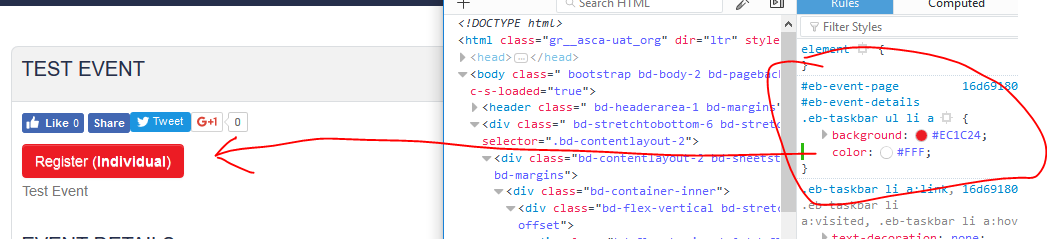
You just need to add 1 line to one of the existing rule sets (color:#FFF;). Replace the first rule set you included earlier with this:
James Riley .: EventBooking user since 2014 ::: JoomDonation user since 2016 :.
.: grfx & web design / IT / AV @ St. Therese Institute of Faith and Mission, Bruno, SK, Canada :.
Replied by James Riley on topic I need Help but not from Tuan
You just need to add 1 line to one of the existing rule sets (color:#FFF;). Replace the first rule set you included earlier with this:
Code:
#eb-event-page #eb-event-details .eb-taskbar ul li a{
background: #EC1C24;
color:#FFF;
}
James Riley .: EventBooking user since 2014 ::: JoomDonation user since 2016 :.
.: grfx & web design / IT / AV @ St. Therese Institute of Faith and Mission, Bruno, SK, Canada :.
Please Log in or Create an account to join the conversation.
- Chris Jarvis
- Topic Author
- Offline
- Elite Member
-
Less
More
- Posts: 210
- Thank you received: 29
8 years 10 months ago #99003
by Chris Jarvis
Replied by Chris Jarvis on topic I need Help but not from Tuan
Thanks James
This has made me feel a lot better about myself as I have tried that lots of times and it doesn't make any difference.
I have added that in now again but the text stays the same colour on the web page
#eb-event-page #eb-event-details .eb-taskbar ul li a{
background: #EC1C24;
color:#FFF;
}
#eb-event-page #eb-event-details .eb-taskbar ul li .cboxElement{
background: #F5F5F5 none repeat scroll 0 0 !important;
}
I can't figure out what I am doing wrong. I must admit I originally put in color: #FFFFFF;
with 3 more F's and a space between color:
Just for my knowledge? Is there a difference you just added #FFF
It's confusing me so much sorry and thanks for the help
This has made me feel a lot better about myself as I have tried that lots of times and it doesn't make any difference.
I have added that in now again but the text stays the same colour on the web page
#eb-event-page #eb-event-details .eb-taskbar ul li a{
background: #EC1C24;
color:#FFF;
}
#eb-event-page #eb-event-details .eb-taskbar ul li .cboxElement{
background: #F5F5F5 none repeat scroll 0 0 !important;
}
I can't figure out what I am doing wrong. I must admit I originally put in color: #FFFFFF;
with 3 more F's and a space between color:
Just for my knowledge? Is there a difference you just added #FFF
It's confusing me so much sorry and thanks for the help
Please Log in or Create an account to join the conversation.
- James Riley
-
- Offline
- Platinum Member
-
8 years 10 months ago - 8 years 10 months ago #99004
by James Riley
James Riley .: EventBooking user since 2014 ::: JoomDonation user since 2016 :.
.: grfx & web design / IT / AV @ St. Therese Institute of Faith and Mission, Bruno, SK, Canada :.
Replied by James Riley on topic I need Help but not from Tuan
FYI - The best way to test CSS and see how changing selectors and rules affects your site is to use the Inspector / Developer Tools built into most major browsers.
I had created a quick video for another forum user a while back showing him what I did to adjust the display of his site using the Inspector ...
.
While it's specific to his site, it might help you to get started in tweaking your own site. And as @jkosick mentioned, Google is your friend (everything I know about CSS has at one time started as a Google search).
I had created a quick video for another forum user a while back showing him what I did to adjust the display of his site using the Inspector ...
.
While it's specific to his site, it might help you to get started in tweaking your own site. And as @jkosick mentioned, Google is your friend (everything I know about CSS has at one time started as a Google search).
James Riley .: EventBooking user since 2014 ::: JoomDonation user since 2016 :.
.: grfx & web design / IT / AV @ St. Therese Institute of Faith and Mission, Bruno, SK, Canada :.
Last edit: 8 years 10 months ago by James Riley. Reason: formatting
The following user(s) said Thank You: Chris Jarvis
Please Log in or Create an account to join the conversation.
- James Riley
-
- Offline
- Platinum Member
-
8 years 10 months ago - 8 years 10 months ago #99005
by James Riley
James Riley .: EventBooking user since 2014 ::: JoomDonation user since 2016 :.
.: grfx & web design / IT / AV @ St. Therese Institute of Faith and Mission, Bruno, SK, Canada :.
Replied by James Riley on topic I need Help but not from Tuan
#FFF = #FFFFFF;
#36C = #3366CC;
At some point in CSS's life, a shortcut was built into the syntax where 1 character could be used instead of 2 when they were both the same.
As for your layout not updating, you might have a site cache running that needs to be cleared at the server level, either in Joomla, a Joomla extension, in your webhost's control panels, via CloudFlare or some other caching service, etc.
#36C = #3366CC;
At some point in CSS's life, a shortcut was built into the syntax where 1 character could be used instead of 2 when they were both the same.
As for your layout not updating, you might have a site cache running that needs to be cleared at the server level, either in Joomla, a Joomla extension, in your webhost's control panels, via CloudFlare or some other caching service, etc.
James Riley .: EventBooking user since 2014 ::: JoomDonation user since 2016 :.
.: grfx & web design / IT / AV @ St. Therese Institute of Faith and Mission, Bruno, SK, Canada :.
Last edit: 8 years 10 months ago by James Riley.
The following user(s) said Thank You: Chris Jarvis
Please Log in or Create an account to join the conversation.
- James Riley
-
- Offline
- Platinum Member
-
8 years 10 months ago #99006
by James Riley
James Riley .: EventBooking user since 2014 ::: JoomDonation user since 2016 :.
.: grfx & web design / IT / AV @ St. Therese Institute of Faith and Mission, Bruno, SK, Canada :.
Replied by James Riley on topic I need Help but not from Tuan
Example on my site.
I use CloudFlare CDN to speed up content delivery. I need to either activate Developer Mode or manually Purge the cache to see changes.
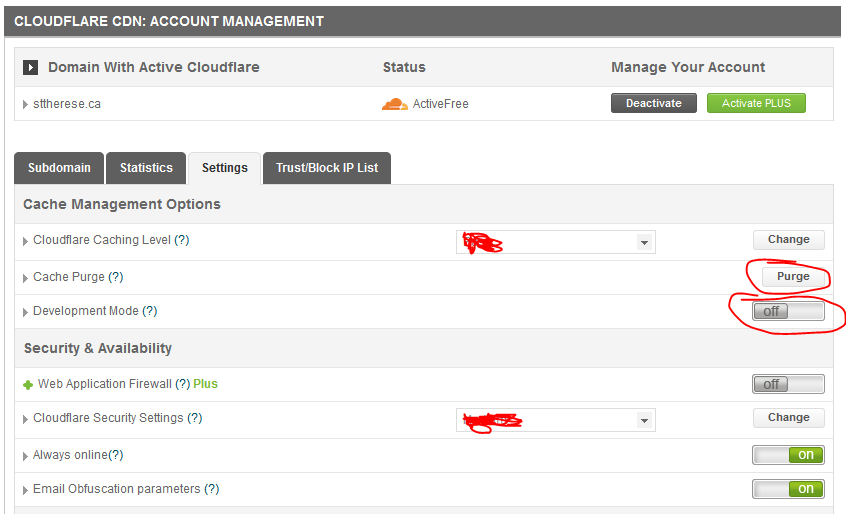
I use CloudFlare CDN to speed up content delivery. I need to either activate Developer Mode or manually Purge the cache to see changes.
James Riley .: EventBooking user since 2014 ::: JoomDonation user since 2016 :.
.: grfx & web design / IT / AV @ St. Therese Institute of Faith and Mission, Bruno, SK, Canada :.
The following user(s) said Thank You: Chris Jarvis
Please Log in or Create an account to join the conversation.
- Chris Jarvis
- Topic Author
- Offline
- Elite Member
-
Less
More
- Posts: 210
- Thank you received: 29
8 years 10 months ago - 8 years 10 months ago #99007
by Chris Jarvis
Replied by Chris Jarvis on topic I need Help but not from Tuan
I can't thank you enough James cheers
You've just given me heaps of knowledge and I love that by adding in CSS parts to the inspect element, you see it instantly in the web page of how it can look.
Wow! This is huge for me
Also about the caching examples - I had no idea and wonder if I have been dumb enough to change it to the correct setting before but then doubt myself that i got it wrong when I didn't see it straight away on refresh. So I then removed it before the cache you describe could refresh.
I have a lot to learn and learn how things work.
While I'm pushing my luck, I notice you mention using Cloudfare CDN and that you may be with SiteGround as that looks like our console colour scheme.
Is CDN the go? I have been considering us using it but have only got my head around the concept to be honest and it was good to see using it too.
Again, thank you for the help today. What a great community OS Solution has
Chris
You've just given me heaps of knowledge and I love that by adding in CSS parts to the inspect element, you see it instantly in the web page of how it can look.
Wow! This is huge for me
Also about the caching examples - I had no idea and wonder if I have been dumb enough to change it to the correct setting before but then doubt myself that i got it wrong when I didn't see it straight away on refresh. So I then removed it before the cache you describe could refresh.
I have a lot to learn and learn how things work.
While I'm pushing my luck, I notice you mention using Cloudfare CDN and that you may be with SiteGround as that looks like our console colour scheme.
Is CDN the go? I have been considering us using it but have only got my head around the concept to be honest and it was good to see using it too.
Again, thank you for the help today. What a great community OS Solution has
Chris
Last edit: 8 years 10 months ago by Chris Jarvis.
Please Log in or Create an account to join the conversation.
- James Riley
-
- Offline
- Platinum Member
-
8 years 10 months ago - 8 years 10 months ago #99027
by James Riley
James Riley .: EventBooking user since 2014 ::: JoomDonation user since 2016 :.
.: grfx & web design / IT / AV @ St. Therese Institute of Faith and Mission, Bruno, SK, Canada :.
Replied by James Riley on topic I need Help but not from Tuan
Hi Chris,
Yes -- I host with SiteGround. The free CloudFlare seems to work well, reducing my bandwidth usage and speeding up my page access times (before using CloudFlare, I found that the template that I use can sometimes cause my site load time to lag a bit as it is a little bit extension-heavy).
As you already know, Tuan's team is amazing and will certainly help out too, and his template designer knows his way around CSS. I often try to jump in on CSS questions here on the forum, too.
As I'm in the western hemisphere, I can often post a response while the dev team based in Vietnam rests up in preparation for another action-filled day of web coding

Happy web designing!
Yes -- I host with SiteGround. The free CloudFlare seems to work well, reducing my bandwidth usage and speeding up my page access times (before using CloudFlare, I found that the template that I use can sometimes cause my site load time to lag a bit as it is a little bit extension-heavy).
As you already know, Tuan's team is amazing and will certainly help out too, and his template designer knows his way around CSS. I often try to jump in on CSS questions here on the forum, too.
As I'm in the western hemisphere, I can often post a response while the dev team based in Vietnam rests up in preparation for another action-filled day of web coding
Happy web designing!
James Riley .: EventBooking user since 2014 ::: JoomDonation user since 2016 :.
.: grfx & web design / IT / AV @ St. Therese Institute of Faith and Mission, Bruno, SK, Canada :.
Last edit: 8 years 10 months ago by James Riley.
Please Log in or Create an account to join the conversation.
Moderators: Tuan Pham Ngoc
Support
Documentation
Information
Copyright © 2026 Joomla Extensions by Joomdonation. All Rights Reserved.
joomdonation.com is not affiliated with or endorsed by the Joomla! Project or Open Source Matters.
The Joomla! name and logo is used under a limited license granted by Open Source Matters the trademark holder in the United States and other countries.
The Joomla! name and logo is used under a limited license granted by Open Source Matters the trademark holder in the United States and other countries.